
WCAG 2.2 vs WCAG 2.0: What Changed and Why It Matters
Website accessibility has become an essential part of modern web development. Businesses, educational institutions, government organizations, and service providers increasingly need to ensure that their websites can be used by people with different abilities and assistive technologies. The Web Content Accessibility Guidelines (WCAG), developed by the World Wide Web Consortium (W3C), provide an internationally recognized framework for improving digital accessibility.
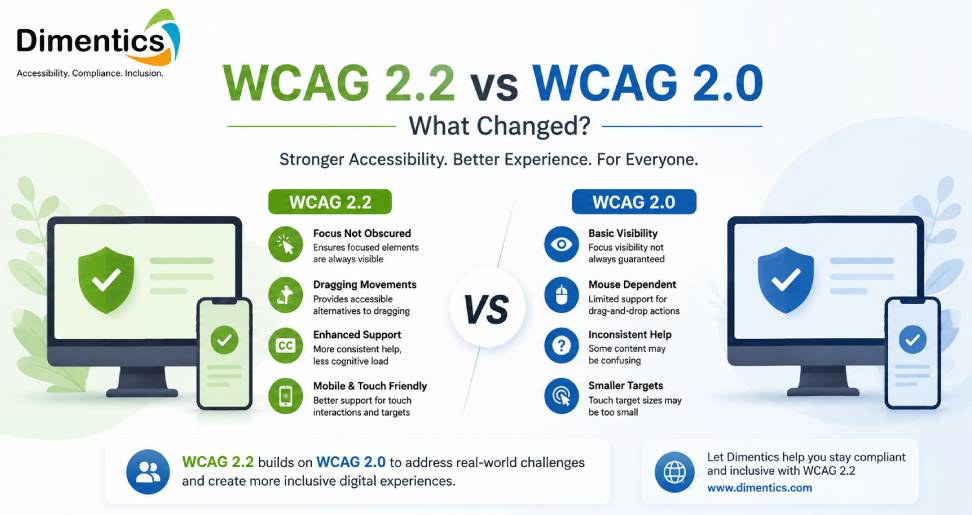
WCAG 2.0 was published in 2008 and established the foundation for modern web accessibility. Since then, web technologies and user expectations have evolved considerably. WCAG 2.2 builds on the earlier guidelines by introducing additional requirements, particularly around keyboard focus, pointer interactions, authentication, and usability. WCAG 2.2 became a W3C Recommendation in October 2023.
So, what exactly changed between WCAG 2.0 and WCAG 2.2? Let’s explore the key differences.
Understanding WCAG 2.0
WCAG 2.0 introduced four core accessibility principles: Perceivable, Operable, Understandable, and Robust, commonly known as POUR. These principles provide the foundation for making digital content accessible to people with disabilities.
WCAG 2.0 organizes accessibility requirements into testable Success Criteria and three conformance levels:
- Level A: Minimum accessibility requirements
- Level AA: A more comprehensive level commonly targeted by organizations
- Level AAA: The highest level, although it is not generally practical to require AAA for entire websites
The guidelines were designed to remain applicable as web technologies changed.
WCAG 2.2 Builds on WCAG 2.0
One important point is that WCAG 2.2 did not completely replace the foundation established by WCAG 2.0. Instead, it extends the WCAG 2 framework.
W3C states that WCAG 2.2 uses an additive approach. Websites that conform to WCAG 2.2 also conform to WCAG 2.1 and WCAG 2.0, with the important exception that Success Criterion 4.1.1 Parsing has been removed from WCAG 2.2.
This means businesses familiar with WCAG 2.0 do not need to completely redesign their accessibility strategy. Instead, they should review the additional requirements introduced in later versions.
The Major Changes in WCAG 2.2
WCAG 2.2 introduced nine new Success Criteria. These focus on practical barriers that users can experience while navigating websites and completing tasks.
1. Focus Not Obscured
WCAG 2.2 introduces Focus Not Obscured at Level AA and an enhanced Level AAA requirement.
The minimum requirement states that when a component receives keyboard focus, it should not be completely hidden by content created by the website. This is particularly important for websites using sticky headers, fixed navigation bars, pop-ups, or sticky footers.
For example, imagine a keyboard user navigating through a form. If the focused field disappears behind a fixed footer, the user may not know where they are on the page.
WCAG 2.2 addresses this problem directly.
2. Focus Appearance
WCAG 2.2 also introduces Focus Appearance at Level AAA. It strengthens expectations around the visibility and contrast of keyboard focus indicators.
A visible focus indicator helps users understand which interactive element is currently selected when navigating without a mouse. This can be especially useful for people with visual or motor disabilities.
3. Dragging Movements
Many modern websites use drag-and-drop functionality for uploading files, rearranging content, selecting items, or interacting with visual interfaces.
WCAG 2.2’s Dragging Movements criterion requires functionality that uses dragging to have a single-pointer alternative unless dragging is essential.
For example, instead of requiring users to drag an item to rearrange a list, a website could provide buttons to move the item up or down. This creates a more accessible alternative for users who have difficulty performing precise mouse movements.
4. Target Size (Minimum)
WCAG 2.2 introduces a Level AA requirement for minimum pointer target size.
Generally, pointer targets should be at least 24 × 24 CSS pixels, subject to specific exceptions. This can make buttons, links, controls, and other interactive elements easier to operate, particularly on touch devices.
This change is especially relevant for mobile-first websites where small buttons can create usability problems.
5. Consistent Help
WCAG 2.2 introduces Consistent Help at Level A.
If a website provides mechanisms such as contact information, self-help options, or support links, users should be able to find those mechanisms consistently when they appear across multiple pages.
Consistent placement can reduce cognitive effort and make websites easier to navigate.
6. Redundant Entry
Another Level A addition is Redundant Entry.
This criterion addresses situations where users are asked to enter information they have already provided during the same process.
For example, if a user has already entered their address during checkout, the website should avoid unnecessarily asking them to type the same information again when it can be automatically populated or selected.
Reducing repetitive data entry can make forms easier to complete.
7. Accessible Authentication
WCAG 2.2 introduces Accessible Authentication requirements at Level AA and AAA.
The goal is to make authentication processes easier for users who may have difficulty remembering, recognizing, or entering information.
The requirements encourage accessible approaches and address barriers created by authentication processes that rely heavily on cognitive functions. Password managers and mechanisms that allow users to paste credentials can help provide more accessible authentication experiences.
8. Removal of 4.1.1 Parsing
One of the most notable differences is that WCAG 2.2 removes Success Criterion 4.1.1 Parsing.
WCAG 2.0 included this criterion to address issues such as malformed markup and duplicate IDs. However, modern browsers and assistive technologies have evolved, and the criterion was considered no longer useful as a separate accessibility requirement.
Therefore, 4.1.1 is marked obsolete and removed in WCAG 2.2.
Organizations that still have formal obligations specifically requiring WCAG 2.0 may need to continue considering how their compliance is documented, even when adopting WCAG 2.2.
WCAG 2.0 vs WCAG 2.2: Key Difference
The simplest way to understand the difference is that WCAG 2.2 is more focused on practical interaction and usability barriers.
WCAG 2.0 established the core accessibility framework. WCAG 2.2 expands that framework with requirements covering:
- Keyboard focus visibility
- Touch and pointer target sizes
- Drag-and-drop alternatives
- Consistent access to help
- Reducing repetitive form entry
- More accessible authentication
- Modern interaction patterns
Rather than replacing the original principles, WCAG 2.2 extends them to address newer website experiences.
Why Businesses Should Consider WCAG 2.2
A website can technically contain accessible features while still creating frustrating experiences for users. Modern accessibility therefore requires more than adding alternative text to images or ensuring that pages can be navigated with a keyboard.
Businesses should consider reviewing their websites against WCAG 2.2 to identify practical barriers in navigation, forms, authentication, interactive controls, and mobile interfaces.
This is where a professional accessibility-focused organization such as Dimentics can add value. By combining accessibility assessment, technical review, and practical recommendations, Dimentics can help organizations understand where their websites may fall short of current accessibility expectations and identify areas for improvement.
An accessibility audit can help businesses evaluate keyboard navigation, focus states, forms, interactive controls, headings, contrast, alternative text, and other accessibility considerations.
Should You Upgrade from WCAG 2.0 to WCAG 2.2?
For organizations beginning a new accessibility project, using the latest WCAG version is generally the better long-term approach. W3C recommends adopting WCAG 2.2 as a new conformance target to improve accessibility and prepare for future requirements.
However, organizations should also consider applicable laws, contracts, procurement requirements, and internal accessibility policies. If a specific policy explicitly references WCAG 2.0, compliance teams should determine how WCAG 2.2 can be incorporated without overlooking existing obligations.
Final Thoughts
The difference between WCAG 2.0 and WCAG 2.2 is not simply a change in version number. WCAG 2.2 reflects how websites are used today, with greater attention to keyboard focus, touch interactions, authentication, forms, and practical usability.
WCAG 2.0 remains an important foundation, but WCAG 2.2 provides additional guidance for creating more accessible digital experiences. For businesses looking to improve accessibility, conducting a structured WCAG 2.2 assessment can be an effective starting point.
With support from accessibility specialists such as Dimentics, organizations can identify accessibility barriers, prioritize improvements, and work toward creating websites that are easier for everyone to use.
Latest Blog
- Curriculum Mapping Services for U.S. Schools and Educational Publishers
- How to Reduce Corporate Training Costs Without Compromising Learning Quality
- How to Create Interactive Digital Textbooks for K–12 Publishers in the USA
- Scenario-Based Learning Development Services for Corporate Training
- How eLearning Solutions Help Businesses Improve Employee Training and Performance